

EzDent-i Bridge
In the Main Menu, click Setup, Program Links. Double-click on EzDent-i.
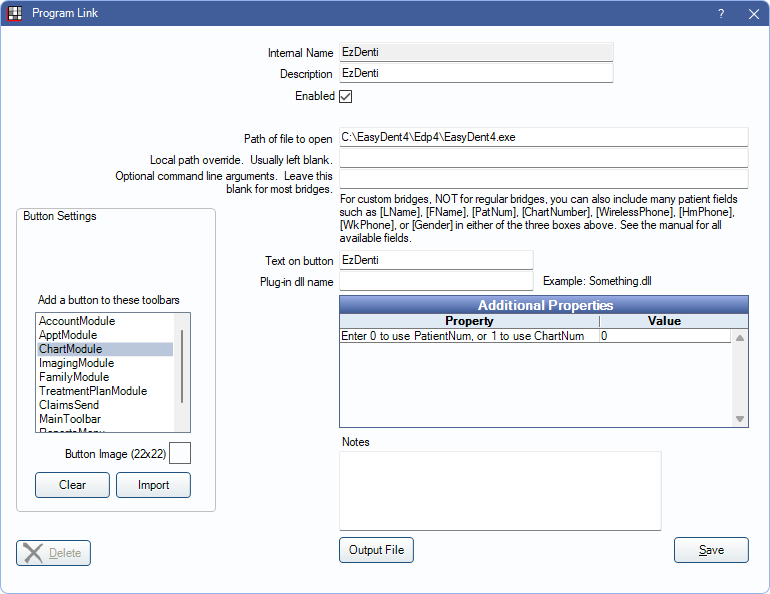
EzDent-i is an imaging product from Vatech. Website: vatechamerica.com/products/ezdent-i.
This bridge can also be used for GoodDrs (DrsViewer Pro). https://gooddrs.us/.
Vatech also offers the CleverOne Bridge which should be used for new VATECH users or existing VATECH users on a newer version of Open Dental.
Bridge Setup
Enter the necessary settings to enable this bridge. Only the fields that need edits are displayed below.
- Enabled: Check to enable this bridge.
- Path of file to open: The location of the program executable. Defaults to C:\Program Files (x86)\VATECH\EzDent-i\Bin\VTE2Loader32.exe.
- EZDent-i, 2.3.6 -or- Older version: replace the path with:C:\Program Files (x86)\VATECH\EzDent-i\Bin\VTEzDent-iLoader32.exe
- EZDent-i, 3.0.0 -or- Newer version: replace the path with:C:\Program Files (x86)\VATECH\EzDent-i\Bin\VTE2Loader32.exe
- Alternatively - VTEzBridge.exe can also be used for either version
- Text on button: The description used on the button as it appears in the toolbar. Defaults to EzDent-i.
- Additional Properties: Enter any additional properties to launch this bridge accurately.
- Enter 0 to use PatientNum, or 1 to use ChartNum: Double-click to determine which identifier is used to launch the patient in the bridge. Usually 0.
- Button Settings: Determine the visual behavior of the bridge button.
- Hide Button for Clinics: If using clinics, determine which clinics this button should and should not display for.
- Add a button to these toolbars: Determine which toolbars this button should display under. Defaults to ChartModule.
- Button Image: (Optional) Import an image to show on the button (must be exactly 22 x 22 pixels).
Click Save to submit changes.
Technical Details
The bridge sends patient data from Open Dental to an XML text file. Example file:
<LinkageParameter>
<Patient LastName="Smith" FirstName="John" ChartNumber="123">
<Birthday>18/12/1972</Birthday>
<Address>123 Main St, Salem, OR</Address>
<ZipCode>97302</ZipCode>
<Phone>(503)363-5432</Phone>
<Mobile>(503)215-3215</Mobile>
<SocialID>123456789</SocialID>
<Gender>Male</Gender>
</Patient>
</LinkageParameter>
The text file is called linkage.xml, and is created in the same folder on the local computer as the EzDent-i program is located.
Open Dental then launches EzDent-i, which picks up the information in the linkage.xml file.
If no file is present, EzDent-i opens with no patient selected.
If the patient is not recognized by EasyDent, a new patient is created in EzDent-i.