

Clever One Bridge
In the Main Menu, click Setup, Program Links. Double-click on Clever One by VATECH.
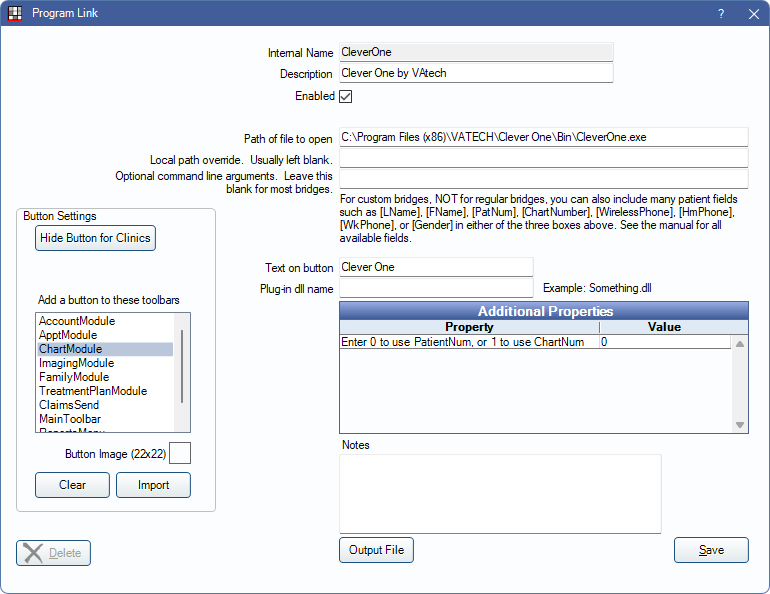
CleverOne is the updated imaging product from VATECH. Website: vatechamerica.com/products/clever-one.
VATECH also offers the EzDent-i Bridge. New VATECH users should start by using CleverOne. Existing users may need to switch from EzDent-i to the CleverOne bridge.
Bridge Setup
Enter the necessary settings to enable this bridge. Only the fields that need edits are displayed below.
- Enabled: Check to enable this bridge.
- Path of file to open: The location of the program executable. Normally, this is C:\Program Files\VATECH\CleverOne\Bin\CleverOne.exe.
- Text on button: The description used on the button as it appears in the toolbar. Defaults to Clever One.
- Additional Properties: Enter any additional properties to launch this bridge accurately.
- Enter 0 to use PatientNum, or 1 to use ChartNum: Double-click to determine which identifier is used to launch the patient in the bridge. Usually 0.
- Button Settings: Determine the visual behavior of the bridge button.
- Hide Button for Clinics: If using clinics, determine which clinics this button should and should not display for.
- Add a button to these toolbars: Determine which toolbars this button should display under. Defaults to ChartModule.
- Button Image: (Optional) Import an image to show on the button (must be exactly 22 x 22 pixels).
Click Save to submit changes.