

TigerView Bridge
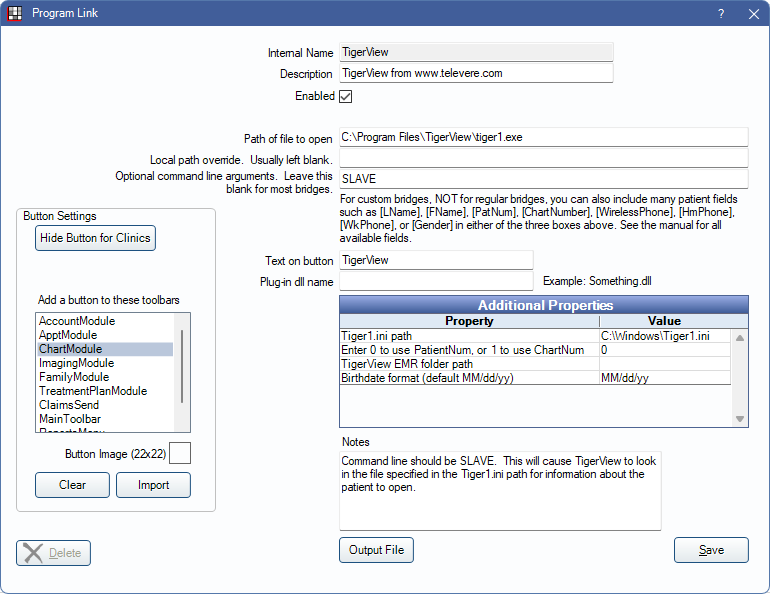
In the Main Menu, click Setup, Program Links. Double-click on TigerView from www.televere.com.
TigerView is an imaging software. Website: www.televeresystems.com.
Visix for ScanX is a rebranded version of TigerView, so use the TigerView bridge to set up the Visix software. ScanX also has a self-named intraoral camera, which does not use this bridge. This bridge is for Visix and TigerView software only.
Bridge Setup
Enter the necessary settings to enable this bridge. Only the fields that need edits are listed:
- Enabled: Check to enable this bridge.
- Path of file to open: The location of the program executable. Defaults to C:\Program Files\TigerView\tiger1.exe.
- Optional command line arguments.: Command line arguments that affect the behavior of the bridge. Defaults to SLAVE.
- Additional Properties: Double-click a row to change settings.
- Tiger1.ini path: Location of the .ini file. Defaults to C:\Windows\Tiger1.ini. It should always be set to match the default TigerView ini path because TigerView always looks to its default path and does not return patient data if it cannot find the ini file. Note: Certain newer versions of TigerView may require the Tiger1.ini file to be located in the same folder as the Tiger1.exe program file (e.g., C:\tigerview8\).
- Enter 0 to use PatientNum, or 1 to use ChartNum: Determine which identifier is used to launch the patient in the bridge.
- TigerView EMR folder path: If displaying thumbnails of Tigerview images in Open Dental, enter the thumbnail folder path.
- Birthdate format (default MM/dd/yy): Enter the birthdate format used. It should be set to MM/dd/yy (default) or MM/dd/yyyy (4-digit year).
- Tiger1.ini path: Location of the .ini file. Defaults to C:\Windows\Tiger1.ini. It should always be set to match the default TigerView ini path because TigerView always looks to its default path and does not return patient data if it cannot find the ini file.
- Text on button: (Optional) Enter the text that is displayed for the bridge button.
- Button Settings: Determine the visual behavior of the bridge button.
- Hide Button for Clinics: If using clinics, determine which clinics this button should and should not display for.
- Add a button to these toolbars: Determine which toolbars this button should display under. Defaults to ChartModule.
- Button Image: (Optional) Import an image to show on the button (must be exactly 22 x 22 pixels).
Click Save to keep changes.
Technical Details
If the patient doesn't yet exist in the imaging software, a record is created using the patient's name and patnum.
Thumbail Integration
TigerView has the ability to display image thumbnails in Open Dental. Thumbnails are copied from the TigerView export folder into the patient's OpenDentImages folder. When set up, images are placed in an Image Category named x-ray. If an x-ray Image Category does not already exist, one is automatically created. To display these images in the Chart Module, set the x-ray Image Category usage to Show Thumbnails in Definitions: Image Categories.
.ini File
Open Dental writes data to the Tiger1.ini file similar to this:
[Slave]
LastName=Spander
FirstName=Jeremy
PatientID=1234
PatientSSN=123456789
Gender=Male
DOB=03/21/75
AddrStreetNo=123 Main
AddrCity=
AddrState=OR
AddrZip=97302
PhHome=(503)363-5432
PhWork=(503)271-3821
Open Dental then launches TigerView. TigerView opens with no splash screen to the designated patient. TigerView deletes the patient information from the ini file.