

SOTA Cloud Bridge
In the Main Menu, click Setup, Program Links. Double-click on SOTA Cloud from sotacloud.com.
SOTA Cloud is an imaging software. Website: https://sotaimaging.com/.
Bridge Setup
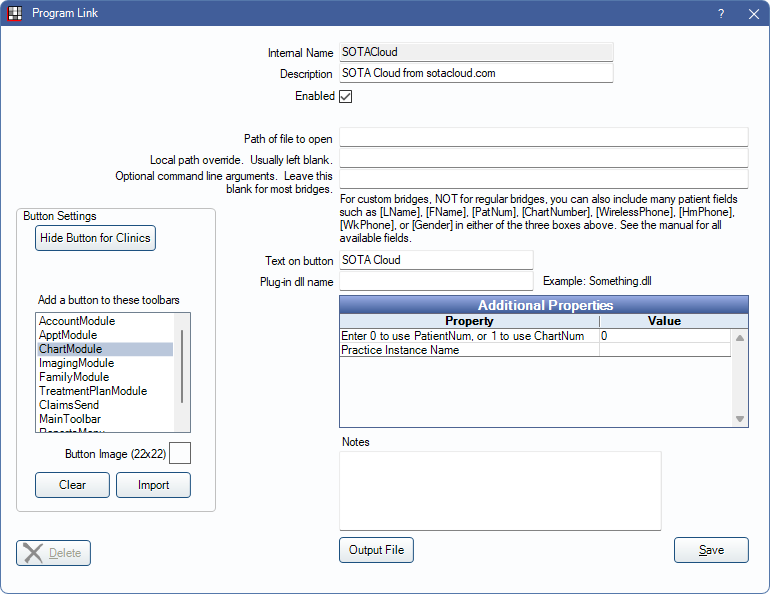
Enter the necessary settings to enable this bridge. Only the fields that need edits are listed:
- Enabled: Check to enable this bridge.
- Additional Properties: Double-click a row to change settings.
- Enter 0 to use PatientNum, or 1 to use ChartNum: Determine which identifier is used to launch the patient in the bridge.
- Practice Instance Name: A unique identifier provided by SOTA. Required..
- Text on button: (Optional) Enter the text that is displayed for the bridge button.
- Button Settings: Determine the visual behavior of the bridge button.
- Hide Button for Clinics: If using clinics, determine which clinics this button should and should not display for.
- Add a button to these toolbars: Determine which toolbars this button should display under. Defaults to ChartModule.
- Button Image: (Optional) Import an image to show on the button (must be exactly 22 x 22 pixels).
Click Save to keep changes.
Technical Details
This bridge uses an API so there is no local path to set and no executable to launch. The bridge is launched using the workstation's default web browser. SOTA Cloud is only compatible with Chromium-based browsers (e.g., Google Chrome, Microsoft Edge, etc.)
SOTA can only accept one email address for a patient. If a patient has more than one email address entered into the Edit Patient Information window, then only the first valid email address is used.
If utilizing the SOTA Hub, use the ClioSoft/SOTA Imaging Bridge instead.