

RayMage Bridge
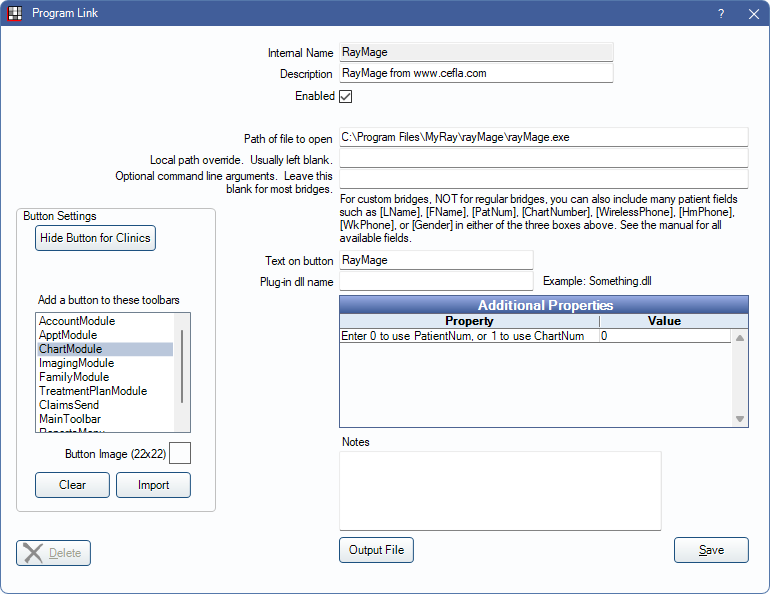
In the Main Menu, click Setup, Program Links. Double-click on RayMage from www.cefla.com.
RayMage is imaging software. Website: www.cefla.com/en.
Bridge Setup
Enter the necessary settings to enable this bridge. Only the fields that need edits are listed:
- Enabled: Check to enable this bridge.
- Path of file to open: The location of the program executable. Defaults to C:\Program Files\MyRay\rayMage\rayMage.exe.
- Additional Properties: Double-click a row to change settings.
- Enter 0 to use PatientNum, or 1 to use ChartNum: Determine which identifier is used to launch the patient in the bridge.
- Text on button: (Optional) Enter the text that is displayed for the bridge button.
- Button Settings: Determine the visual behavior of the bridge button.
- Hide Button for Clinics: If using clinics, determine which clinics this button should and should not display for.
- Add a button to these toolbars: Determine which toolbars this button should display under. Defaults to ChartModule.
- Button Image: (Optional) Import an image to show on the button (must be exactly 22 x 22 pixels).
Click Save to keep changes.
Technical Details
If the patient ID already exists in RayMage, then the corresponding patient folder is opened. If the patient ID does not exists in RayMage, then a new patient folder is created and opened. When a patient ID already exists in RayMage and the patient name passed in does not match (for example when a patient name is updated), then a message box displays in RayMage asking the user if they want to change the patient name and the patient folder corresponding to the existing ID is opened.
Open Dental launches RayMage with the following command line arguments:
/PATID "123456" /NAME "John" /SURNAME "Smith"
The name and surname arguments is the patient's first and last name with all spaces and quotes removed from them.