

PDMP Bridge
In the Main Menu, click Setup, Program Links, PDMP.
The PDMP (Prescription Drug Monitoring Program) bridge is for users in California, Illinois, Kentucky, Maryland, Utah, and Washington. Users must be on support with Open Dental to use this feature.
To register for PDMP:
- Illinois users can register here: https://www.ilpmp.org/CDC/registration.php
- California, Kentucky, Maryland, Utah, and Washington can register here: https://iam.logicoy.com/cas/views/pmpRegistration
Note: Users in other states may consider the Bamboo Bridge instead.
The following must be set before using the PDMP bridge:
- Providers must have a First Name, Last Name, DEA Number, and National Provider ID entered.
- Patients must have a First Name, Last Name, Birthdate, Zip Code, and Gender entered.
- The logged-on User must be associated with a provider.
- The Open Dental Service must be installed and running.
Bridge Setup
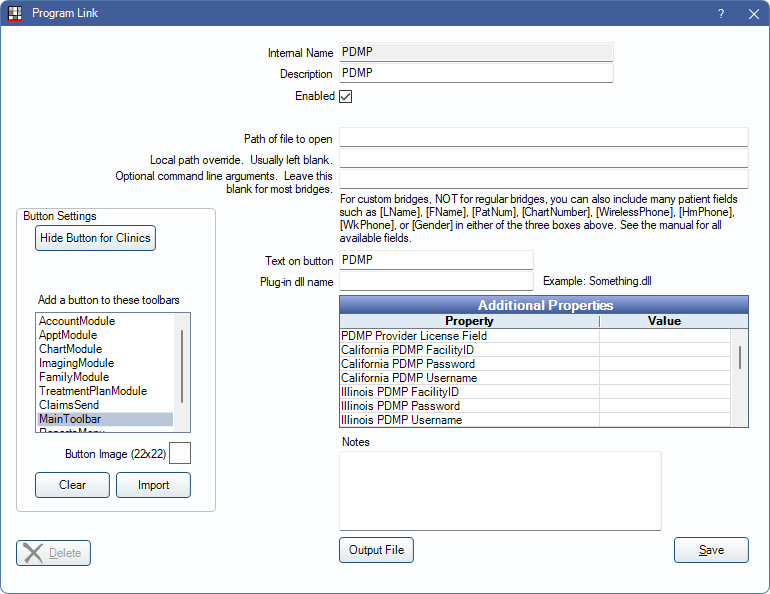
Enter the necessary settings to enable this bridge. Only the fields that need edits are listed:
- Enabled: Check to enable this bridge.
- Additional Properties: Double-click a row to change settings. Credentials are issued by Logicoy and are required. Enter the credentials for your state only.
- PDMP Provider License Field: Enter the state license or the state Rx ID. If this field is left blank, the state license is used.
- PDMP FacilityID: Enter the practice name.
- PDMP Username: Enter the username used when accessing PDMP.
- PDMP Password: Enter the password used when accessing PDMP.
- Text on button: (Optional) Enter the text that is displayed for the bridge button.
- Button Settings: Determine the visual behavior of the bridge button.
- Hide Button for Clinics: If using clinics, determine which clinics this button should and should not display for.
- Add a button to these toolbars: Determine which toolbars this button should display under. Defaults to MainToolbar.
- Button Image: (Optional) Import an image to show on the button (must be exactly 22 x 22 pixels).
Click Save to keep changes.
Technical Details
Users must log into the PDMP Portal at least once every 90 days to keep the account active.