

Genoray Triana Bridge
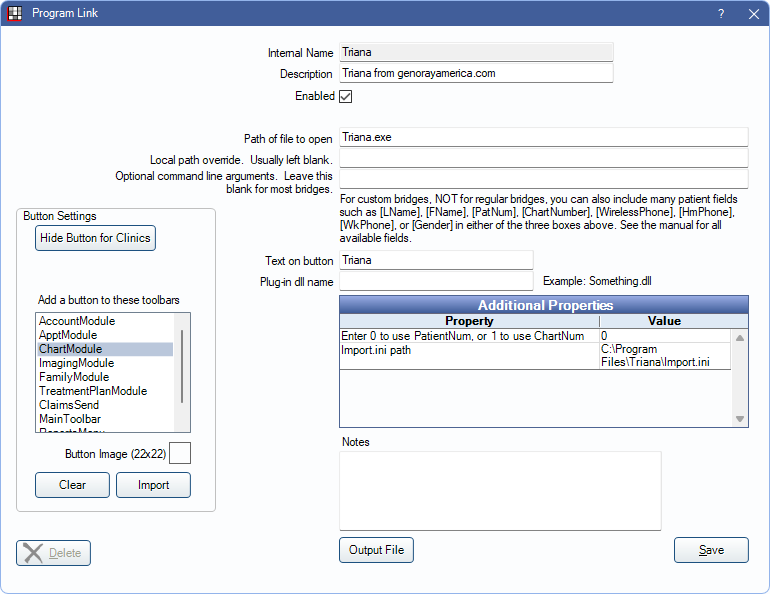
In the Main Menu, click Setup, Program Links. Double-click on Triana from genorayamerica.com.
Genoray Triana is an imaging software. Website: http://www.genorayamerica.com/.
Bridge Setup
Enter the necessary settings to enable this bridge. Only the fields that need edits are listed:
- Enabled: Check to enable this bridge.
- Path of file to open: The location of the program executable. Defaults to Triana.exe.
- Additional Properties: Double-click a row to change settings.
- Enter 0 to use PatientNum, or 1 to use ChartNum: Determine which identifier is used to launch the patient in the bridge.
- Import.ini path: Location of the .ini file. Defaults to C:\Program Files\Triana\Import.ini.
- Text on button: (Optional) Enter the text that is displayed for the bridge button.
- Button Settings: Determine the visual behavior of the bridge button.
- Hide Button for Clinics: If using clinics, determine which clinics this button should and should not display for.
- Add a button to these toolbars: Determine which toolbars this button should display under. Defaults to ChartModule.
- Button Image: (Optional) Import an image to show on the button (must be exactly 22 x 22 pixels).
Click Save to keep changes.
Technical Details
Open Dental may need to be set to run as administrator to have the permissions to access C:\Program Files\ for the .ini path.
Command Line: An example of the command line function that we use would be:
C:\Program Files\Triana\triana.exe -Fc:\Program Files\Triana\import.iniThis command line opens Triana with the patient from the import.ini file. Programmatically we update the import.ini when the user clicks the button.
Import.ini Path
[OPERATION]
EXECUTE=3 (required)
(Available 2: Open, 3: Registration and open/If he or she has been registered just reopen, 4: Onlyregistration)
[PATIENT]
PATIENTID=Patient_ID(Chart No.) (Required)
FIRSTNAME=Patient_First_Name (Required)
LASTNAME= Patient_Last_Name
SOCIAL_SECURITY=Social_Security_Number
BIRTHDAY=YYYYMMDD ( Ex: 19801231 )
PATIENTCOMMENT=Patient comment (This will be blank)
GENDER= Sex_ID (Available 1: Male, 2: Female, 3: Another)