

EvaSoft Bridge
In the Main Menu, click Setup, Program Links. Double-click on EvaSoft from www.imageworkscorporation.com.
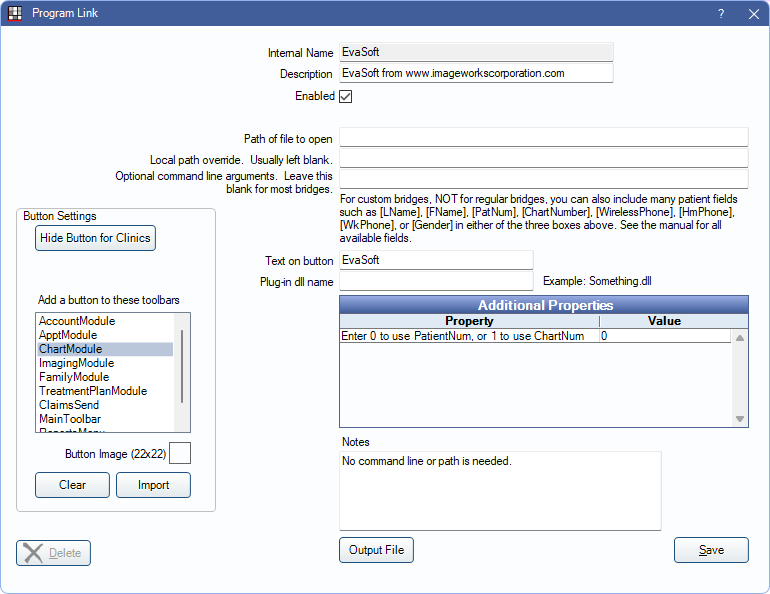
EvaSoft is a digital imaging program from ImageWorks. Website: https://www.imageworkscorporation.com/evasoft-software/. The bridge for AFP Imaging Bridge can also be used. Also known as Dent-X ProImage and Eva.
Bridge Setup
Enter the necessary settings to enable this bridge. Only the fields that need edits are listed:
- Enabled: Check to enable this bridge.
- Additional Properties: Double-click a row to change settings.
- Enter 0 to use PatientNum, or 1 to use ChartNum: Determine which identifier is used to launch the patient in the bridge.
- Text on button: (Optional) Enter the text that is displayed for the bridge button.
- Button Settings: Determine the visual behavior of the bridge button.
- Hide Button for Clinics: If using clinics, determine which clinics this button should and should not display for.
- Add a button to these toolbars: Determine which toolbars this button should display under. Defaults to ChartModule.
- Button Image: (Optional) Import an image to show on the button (must be exactly 22 x 22 pixels).
Click Save to keep changes.
Technical Details
The ProImage database is based on the patient ID. When using the bridge, the patient ID gets sent along with name, birthdate, address, etc.
If the patient ID is not found in the database, then it creates a new patient record. If the ID is found, and the information does not match, then it overwrites all existing patient name, address, etc, with the new information. Every single ID in the ProImage database must be accurate, or the names on each record may be changed.
To test the setup if there are already patients entered in ProImage:
- Open a patient information window in ProImage to see the name, ID, address, etc. Try to use the Update Patient button.
- Open the same patient in Open Dental. Go to the Family Module and open the Edit Patient Information window.
- Compare the ID in ProImage with the Patient Number in Open Dental. They must match before the bridge can be used.
- If they don't match, go through every patient in ProImage and change the ID to the Open Dental Patient Number. Print a list ahead of time with all names and Patient Numbers from Open Dental. Obtain this list by running this query in the User Query window:
SELECT PatNum AS PatID,LName,FName, Birthdate FROM patient ORDER BY LName,FName
- If using chart numbers heavily in the office, then there is an option to use chart numbers as the patient ID in both programs. The chart numbers must be entered for all patients in Open Dental. Also, if there are existing patient records in ProImage, then the chart numbers entered in the patient ID field must be blank for all patients.
EvaSoft may ask to set up Data Drill. This is not required since this bridge does the same thing.