

DentalTek Bridge
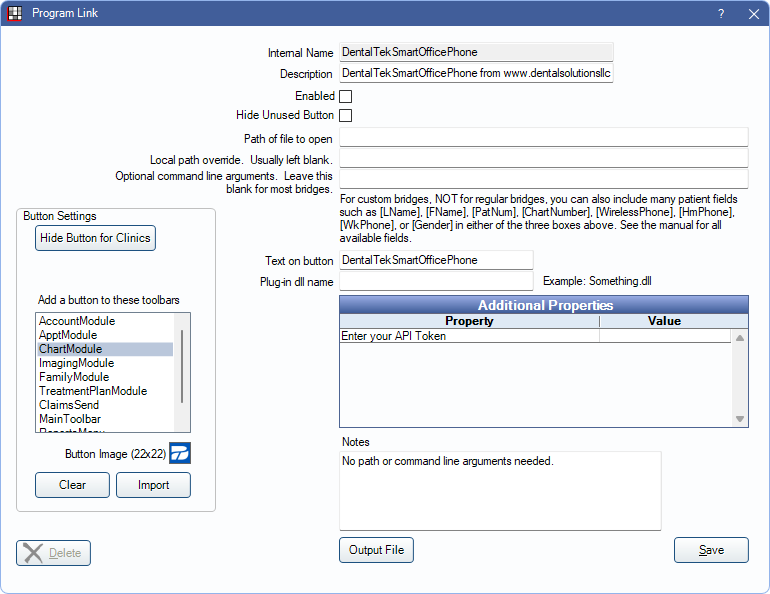
In the Main Menu, click Setup, Program Links. Double-click on DentalTekSmartOfficePhone from www.dentalsolutionsllc.com.
DentalTek offers a comprehensive suite of services including cloud hosting, VOIP phones integrated with Open Dental, discounts on supplies and labs, and patient communications. To sign up for DentalTek and begin using their services, contact DentalTek. Users must be signed up for DentalTek to use the bridge in Open Dental. Once the bridge is setup, phone numbers in Open Dental can be clicked to call the patient using DentalTek.
Bridge Setup
Enter the necessary settings to enable this bridge. Only the fields that need edits are listed:
- Enabled: Check to enable this bridge.
- Additional Properties: Double-click the field to enter the API token provided by DentalTek.
- Button Settings:Determine the visual behavior of the bridge button.
- Hide Button for Clinics: If using clinics, determine which clinics this button should and should not display for.
- Add a button to these toolbars: Determine which toolbars this button should display under. Defaults to ChartModule.
- Button Image: (Optional) Import an image to show on the button (must be exactly 22 x 22 pixels).
Click Save to keep changes.
Hiding DentalTek Bridge
If DentalTek is not in use, follow the steps to hide the button in the Account Module:
- Uncheck Enabled.
- Check Hide Unused Button.
- Click Save.