

Carestream Bridge
In the Main Menu, click Setup, Program Links. Double-click on Carestream Ortho/OMS from www.carestreamdental.com.
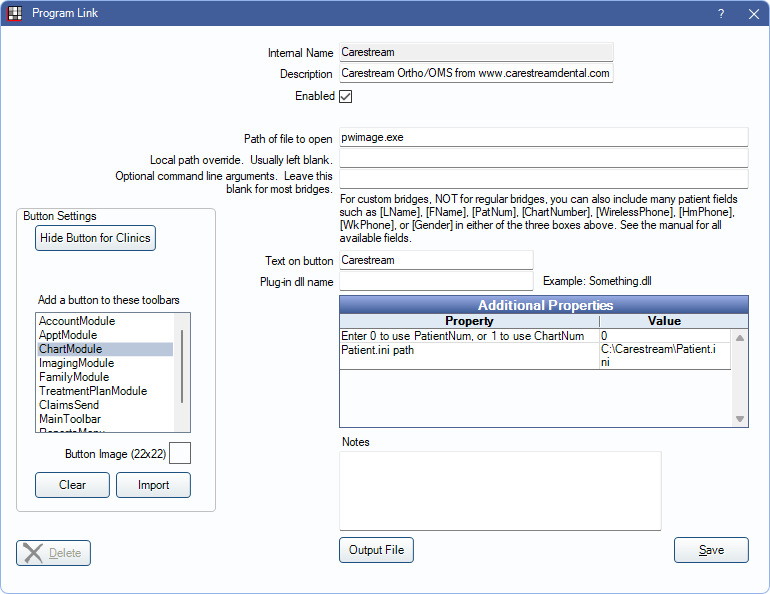
Carestream is a digital imaging software. Website: carestream.com.
This bridge is only for Carestream Ortho/OMS. For the standard Carestream bridge, use Trophy (Enhanced) Bridge.
Bridge Setup
Enter the necessary settings to enable this bridge. Only the fields that need edits are listed:
- Enabled: Check to enable this bridge.
- Path of file to open: The location of the program executable. Defaults to pwimage.exe
- Additional Properties: Double-click a field to enter necessary additional properties:
- Enter 0 to use PatientNum, or 1 to use ChartNum: Determine which identifier is used to launch the patient in the bridge.
- Patient.ini path: Verify the path to the Patient.ini file. Value cannot exceed 150 characters.
- Button Settings:Determine the visual behavior of the bridge button.
- Hide Button for Clinics: If using clinics, determine which clinics this button should and should not display for.
- Add a button to these toolbars: Determine which toolbars this button should display under. Defaults to ChartModule.
- Button Image: (Optional) Import an image to show on the button (must be exactly 22 x 22 pixels).
Click Save to keep changes.