

ADSTRA Bridge
In the Main Menu, click Setup, Program Links. Double-click on ADSTRA Imaging from http://adstra.com/adstra-dental-software/.
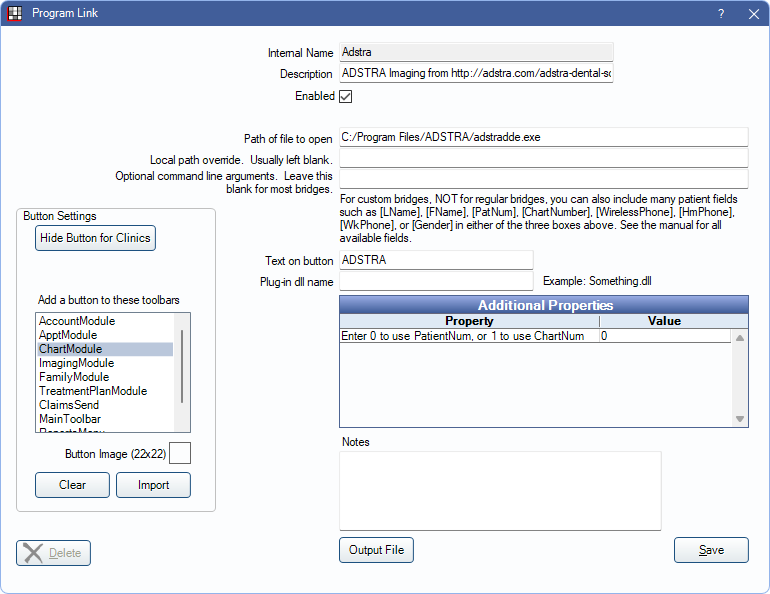
ADSTRA is a digital imaging technology. Website: http://adstra.com/adstra-dental-software/.
Bridge Setup
Enter the necessary settings to enable this bridge. Only the fields that need edits are displayed below.
- Enabled: Check to enable this bridge.
- Path of file to open: The location of the program executable.
- Text on button: The description used on the button as it appears in the toolbar. Defaults to ADSTRA.
- Additional Properties: Enter any additional properties to launch this bridge accurately.
- Enter 0 to use PatientNum, or 1 to use ChartNum: Double-click to determine which identifier is used to launch the patient in the bridge. Usually 0.
- Button Settings: Determine the visual behavior of the bridge button.
- Hide Button for Clinics: If using clinics, determine which clinics this button should and should not display for.
- Add a button to these toolbars: Determine which toolbars this button should display under. Defaults to ChartModule.
- Button Image: (Optional) Import an image to show on the button (must be exactly 22 x 22 pixels).
Click Save to submit changes.
Technical Details
Open Dental sends the selected patient's last name, first name, date of birth, and patient number or chart number to ADSTRA. If the patient does not exist in ADSTRA a new profile is created.