

Search
Statement Send Setup
Use statement templates to determine Message-to-Pay options and default messages for texts and emails sent from the Billing List.
In the Main Menu, click Setup, Account, Statement Send Setup.
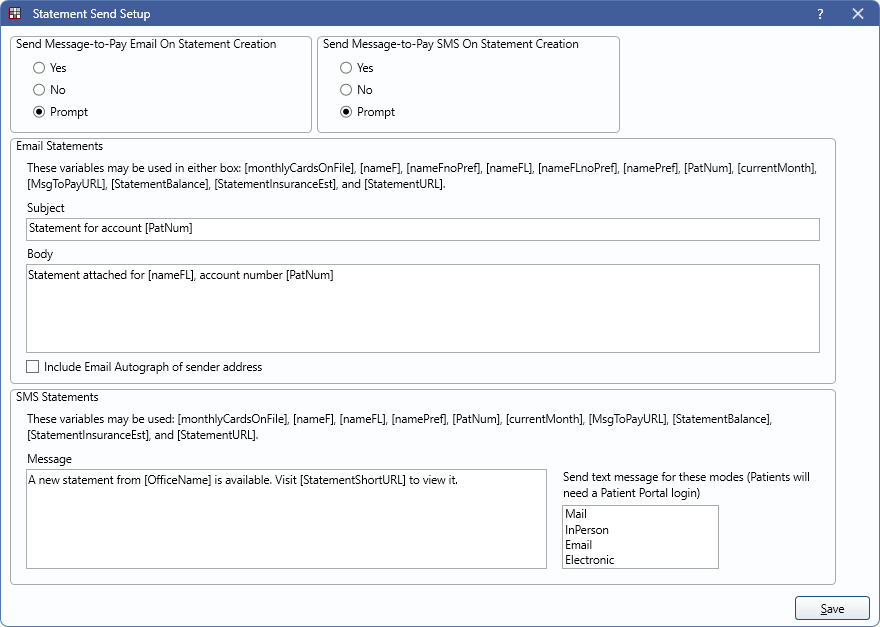
Alternatively, in Billing, click Templates.
Message-to-Pay

Choose to automatically send a Message-to-Pay email or text when the first statement of the day is created using the Email Statements or SMS Statements template. Statements are created when clicking the Statement button from the Account Module, or when using PatPortal, Print, Email, or Save from the Statement Window when the statement is created from the Account Module.
Send Message-to-Pay Email On Statement Creation: Select the behavior for sending a Message-to-Pay email after creating a statement. Email Statements template must contain the [MsgToPayURL] tag to send.
- Yes: Automatically sends Message-to-Pay email.
- No: Does not send Message-to-Pay email.
- Prompt: Prompts to send Message-to-Pay email.
Send Message-to-Pay SMS On Statement Creation: Select the behavior for sending a Message-to-Pay text after creating a statement. SMS Statements template must contain the [MsgToPayURL] tag to send.
- Yes: Automatically sends Message-to-Pay text.
- No: Does not send Message-to-Pay text.
- Prompt: Prompts to send Message-to-Pay text.
Email Statements
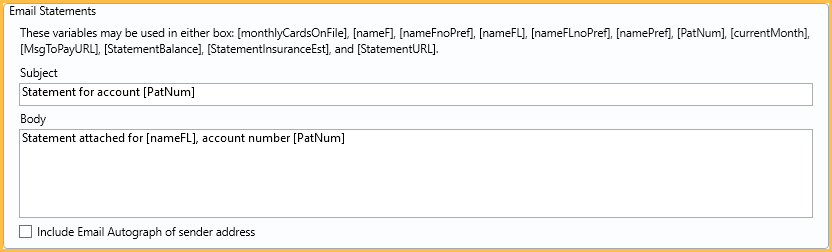
Subject / Body: Edit the default subject and message for statements that are emailed via the Billing List or Account Module. The Body text box supports right-click options.
Include Email Autograph of sender address: When checked, the Email Autograph assigned to the Email From address is automatically added to the end of the email body when generating email bills.
Email is the default mode for a patient when their billing type (in Definitions: Billing Types) has E entered for Email bill. If Secure Email is enabled, the email is sent via a secure email message. If Secure Email is not enabled, the email is sent via unsecured (regular) email. Regular email is not a secure method of sending statements (PHI).
SMS Statements
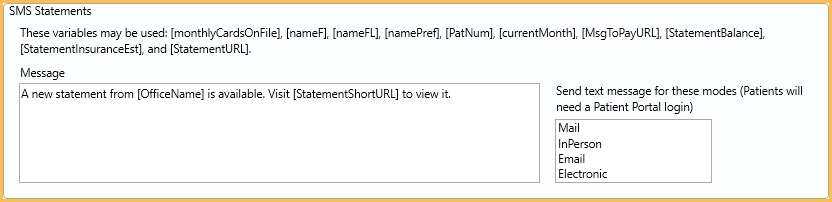
Message: Edit the default message for statements that are sent by SMS (text) via the Billing List. This text box supports right-click options.
Send text message for these modes: Set the default modes to send additional text messages to when generating statements from the Billing List. The text message can include a link the patient can use to make an online payment. Integrated Texting Feature must also be enabled and patient must be set to accept text messages.
Variables
The following tags are available for messages:
- If sending from Statement, Email, the guarantor's information is used.
- If sending from Statement, More Options, Email, the patient's information is used.
- [monthlyCardsOnFile] - The customers credit cards on file. The first 12 digits are masked, and the last four digits are visible followed by expiration date, e.g., XXXX-XXXX-XXXX-1234_exp:01/01. Multiple cards are separated by commas. Cards must be in use for recurring charges with a start date prior to the statement date.
- [nameF] - Guarantor or patient's first name only (no preferred name).
- [nameFnoPref] - Email only. Guarantor or patient's first name only (no preferred name).
- [nameFL] - Guarantor or patient's first name (or preferred name) and last name.
- [nameFLnoPref] - Email only. Guarantor or patient's first and last name (no preferred name),
- [namePref] - Guarantor or patient's preferred name.
- [PatNum] - Patient number.
- [currentMonth] - The current month.
- [MsgToPayURL] - Message-To-Pay link.
- [StatementBalance] - Balance after insurance estimates (i.e., patient portion).
- [StatementInsuranceEst] - Insurance estimate amount.
- [StatementURL] - Include a URL patients can use to launch the Patient Portal Sign in window. See Online Payments.
Notice: Sending the patient's last name in an unsecure email message along with a statement may pose a HIPAA risk. Consider consulting with your HIPAA expert prior to sending unsecure email statements. Secure email statements are available, see Secure Email.