
Help

Search
Pick Sheet
Create a new form for a patient from available Sheets.
In Patient Forms, click Add Sheet.
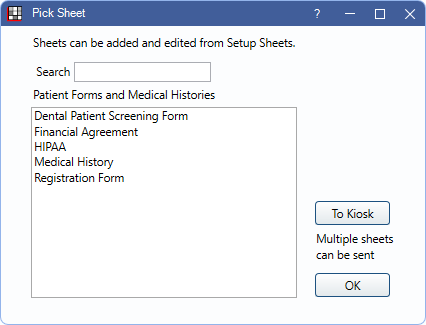
Select one or more available Sheets to create new forms for a patient or send them to Kiosk or eClipboard to be filled out electronically. Sheets with a type of PatientForm or MedicalHistory are listed. Consent forms are also listed if the option Patient Forms window show consent forms is enabled in the Patient Form Options window.
Search: Type a Sheet name to filter the list. Results are updated automatically.
- Sheets listed in this window depend on the following:
- If a Sheet Type (i.e., PatientForm, MedicalHistory, or Consent) has a custom Sheet, only the custom Sheets are listed. If no custom Sheets exist for the Sheet Type, the Internal Sheets for that type are listed.
- To show the internal sheets, if custom Sheets have been created, create a copy of the Internal Sheet in Sheet Defs.
To Kiosk: Highlight one or more forms, then click To Kiosk to queue the Sheets for the Kiosk or eClipboard.
Double-click a Sheet or highlight and click OK to open Fill Sheet.