

Search
Payment Plan Q and A
Below are some questions and answers about Payment Plans.
Information may apply to Payment Plans, Insurance Payment Plans, or Old Payment Plans.
Payment Plans in the Account Module
How are Payment Plan Charges Due and Payment Plan Production posted to an account?
Charges Due, payment plan production, and payments show as line items in patient account grid and affect balances and aging.
When the patient is in the same family as the payment plan guarantor, the behavior is as follows.
- Payment plan charges due (PayPln: Charge Due) and production (PayPln: Production) show as line items in the Patient Account grid.
- Payment plan payments show in the Patient Account gird.
- Payment plan due amounts are included the patient's balance.
- Payment plan amounts due and payments are considered when calculating aging.
- Payment plan Charges Due and production are included on the Receivables Breakdown report.
- Changes made to historical Pay Plan Charges Due affect historical information (e.g., Aging of A/R, Production and Income reports).
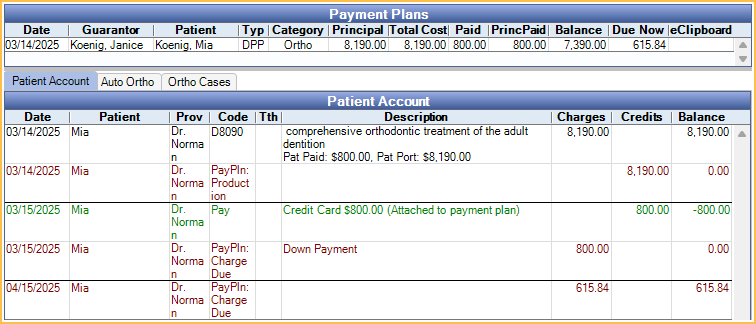
When the patient is in a different family than the payment plan guarantor, the behavior is as follows.
- Payment plan charges due (PayPln: Charge Due) show as line items in the Patient Account grid for the guarantor.
- Payment plan production (PayPln: Production) show as line items in the Patient Account grid for the patient.
- Payment plan payments show in the Patient Account grid for the guarantor.
- Payment plan due amounts are included in the guarantor's balance.

For users not using the default logic, see Pay Plan Charge Logic.
Overcharged Payment Plans
A patient has an Old Payment Plan with overcharged production. How do I reduce the production on the plan and re-allocate the patients' overpayment?
An Old Payment Plan may become overcharged if procedures attached to the plan are discounted or if insurance pays more than expected after the Old Payment Plan is created. To reduce the payment plan charges, the easiest method is to delete the Old Payment Plan and recreate it for the correct procedure balance. However, if payments are attached to the plan, complete the steps below.
In order to correct the Old Payment Plan, it must be open and have a remaining balance equal to the total overcharged amount.
- If the Old Payment Plan is closed, double-click into the plan, click Reopen, then click OK to exit and save.
- Transfer patient income from each overcharged procedure on the Old Payment Plan and allocate it to an outstanding charge or to Unearned Income (to be allocated later). See Income Transfer.
- Double-click back into the Old Payment Plan and create a pay plan adjustment to remove the overcharged production; click Add Adjustment.
- In the Negative Pay Plan Adjustment window, enter the total overcharged amount and click OK. The total adjustment amount is credited to the payment plan. If the total adjustment exceeds a single pay plan charge, the amount is split between the pay plan charges with a remaining balance.
- Associate the pay plan adjustment to the procedure credits attached to the Old Payment Plan; click View Tx Credits.
- In the Payment Plan Procedures and Credits window, highlight the Adjustment credit (blue line item) and click Delete. This removes the unattached credit created by the pay plan adjustment.
- Create a new credit attached to each overcharged procedure. Overcharged procedures have a negative amount in the Rem After column. Highlight the overcharged procedure (yellow line item), verify the amount matches the amount to be credited, and click Add. Repeat for each overcharged procedure on the Old Payment Plan, then click OK to save and exit the Tx Credits window.
- If the amounts on the payment plan summary all match and there are no future charges remaining, the Old Payment Plan may be closed; click Close.
Why do I get a warning that a Payment Plan is overcharged when trying to use the Income Transfer Manager, but the Payment Plan does not appear on the Payment Plans Overcharged Report?
If production (i.e., procedures and adjustments) attached to a Payment Plan has an Amount Override entered or the Payment Plan has Permanent Lock enabled, it does not show on the Payment Plans Overcharged Report, however if trying to use the Income Transfer Manager, there is a warning if production is overcharged.
Payment Plans with an Amount Override entered after all PayPlan Charges have posted for the production, may still appear on the report.
What do I do when I get a warning that a Down Payment must be less than or equal to the total amount?
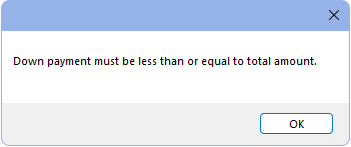
When the Pay Plan Production for a procedure falls below the amount on an already posted Pay Plan Charge Due, the account balance can become inaccurate. This issue may happen when a claim is created before a payment plan is made and insurance ends up paying a greater amount than expected causing the Down Payment to be greater than the Pay Plan Production.
In order to fix this, the Payment Plans Overcharged Report may be run. Alternatively, pull up the Payment Plan and double-click into the Down Payment to edit the Principal amount directly.
Pay Plan Charges Due
When trying to edit a pay plan charge due, I get the message The phrase 'Down Payment' cannot be used in the notes.
This text is used to denote the Down Payment amount. The Down Payment charge is automatically created when the Amortization Schedule is created. If no Down Payment amount was entered when the payment plan was created, other charges due cannot be designated as the Down Payment. The payment plan must be deleted and recreated instead.
The dates for pay plan charges due have changed, but no user edited the Payment Plan.
For Payment Plans, the Open Dental Service must be installed and running in order for pay plan charges due to be posted on the charge date. If the Open Dental Service is not running at the Pay Plan run time on the charge date, the dates for any charges not already created in the database (i.e., already posted or manually edited) are adjusted. The charge dates are moved one increment depending on the Charge Frequency.
For example, if an unposted charge due was scheduled to occur on 10/1/2024 and the Charge Frequency is Monthly, the charge due is rescheduled to occur on 11/1/2024. All subsequent charges due are also rescheduled to occur one month later.
Payment Plan Overpayments
Why do I get a Payment Plan Overpayment Detected warning when trying to attach a payment to a Payment Plan?
When saving a payment where the total amount of payment splits attached to the Payment Plan exceeds the current Due Now balance, a prompt is shown to determine how the overpayment should be handled.
Click Yes to pay the amount toward principal. Once the payment is saved, a new pay plan charge for the excess amount is created and the Payment Plan Balancer is run automatically to allocate the payment to pay plan charges.
Click No to treat the overpayment as a prepayment. Once the payment is saved, the Payment Plan Balancer is run automatically to allocate the payment. The overpayment amount is allocated to the Payment plan unearned type set in Preferences.
Pay Plan Charge Logic
For Versions 24.4 and lower, Pay Plan charge logic can be set in Preferences.
For Versions 25.1 and newer, this preference is only available if an option other than Age Credits and Debits (Default) is currently in use. Once the preference is changed to Age Credits and Debits (Default) , this preference is hidden. The preference is not available for new users or users who switched to Age Credits and Debits (Default).
How does each Pay Plan Logic Preference function?
Pay Plan charge logic was a Preference previously available for determining how PayPln: Charge Due and PayPln: Production line items show in the patient account grid for Payment Plans and Old Payment Plans. It also determined whether PayPlan Production and PayPlan Charges Due affect balances, aging, and reports. This logic did not apply to Insurance Payment Plans.
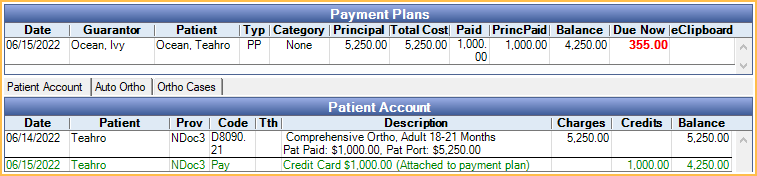
The following is information on how each preference functioned and screenshots of how Payment Plans appeared in the Patient Account grid.
Do Not Age (Legacy): Charges Due and payments only show within the payment plan and do not affect balance or aging.
- PayPlan Charges Due are totaled in the Payment Plans grid under Due Now. Due Now amount is shown in bold red.
- Payment plan payments do not show in the Patient Account grid but in the payment plan. Double-clicking the plan row is the only way to view payment plan payments.
- A single line item for PayPln: Production is added to the patient account grid, thus reducing the total account balance by the amount. The amount is based on the Tx Completed Amt set in the payment plan.
- Other payment plan production, Charges Due, and payments do not show in the account grid nor do they affect balances or aging.
- The total A/R in the Aging of A/R report does not include payment plan due amounts.
- Only changes to the Tx Completed Amount affect aging and production and income reports.
- Payment plan amounts are not included on the Receivables Breakdown Report.
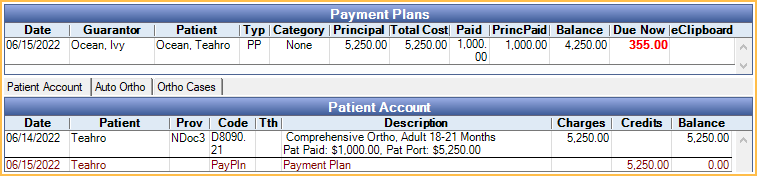
Age Credits and Debits (Default): Charges Due, payment plan production, and payments show as line items in patient account grid and affect balances and aging.
When the patient is in the same family as the payment plan guarantor, the behavior is as follows.
- Payment plan charges due (PayPln: Charge Due) and production (PayPln: Production) show as line items in the Patient Account grid.
- Payment plan payments show in the Patient Account grid.
- Payment plan due amounts are included the patient's balance.
- Payment plan amounts due and payments are considered when calculating aging.
- Payment plan Charges Due and production are included on the Receivables Breakdown report.
- Changes made to historical Pay Plan Charges Due affect historical information (e.g., Aging of A/R, Production and Income reports).
When the patient is in a different family than the payment plan guarantor, the behavior is as follows.
- Payment plan charges due (PayPln: Charge Due) show as line items in the Patient Account grid for the guarantor.
- Payment plan production (PayPln: Production) show as line items in the Patient Account grid for the patient.
- Payment plan payments show in the Patient Account grid for the guarantor.
- Payment plan due amounts are included in the guarantor's balance.
Age Credits Only: Patients are credited for payment plans when the charge comes due, but Charges Due all exist separately from the account grid.
- Each payment PayPln: Production line item shows in the account grid, sorted by Date Showing or Tx Credit date.
- Payment plan amounts due only show in the Payment Plan grid. They do not show in the Patient Account grid.
- Payment plan amounts due are not considered when calculating balances and aging.
- Payment plan production and Charges Due are not included on the Receivables Breakdown report.
- Changes made to historical payment plan production affect historical information (e.g., Aging of A/R, Production and Income reports).
- Payments attached to the payment plan only show in the Payment Plan window; they do not display in the Patient Account grid.
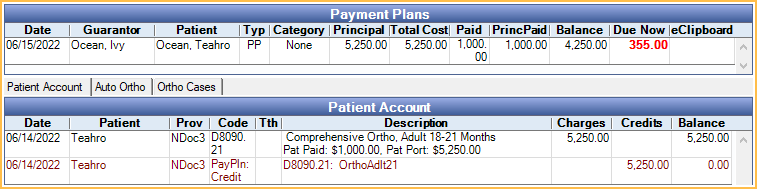
No Charges to Account (Rarely Used): PayPln: Production or PayPln:Charges Due line items are posted to the account. Patients are not credited for payment plans, so the account balance is aged normally.
- Payment plan amounts due only show in the Payment Plan grid. They do not show in the Patient Account grid.
- Payments to payment plans show in Patient Account grid and payment plan.
- Payment plan amounts are not included on the Receivables Breakdown report.
Changing Pay Plan Charge Logic
I am considering transitioning to Age Credits and Debits logic. What do I need to know?
When you first transition, patient account balances change:
- The account balance for any patient with a patient payment plan changes by the payment plan amount currently due.
- The Family Aging amounts include patient payment plan charges currently due.
- The total A/R in the Aging of Accounts Receivable (A/R) Report changes.