

Search
Patient Procedures List
The Patient Procedures List shows procedures for a patient that can be attached to a Group Note.
In the Procedure Group Note, click Add.
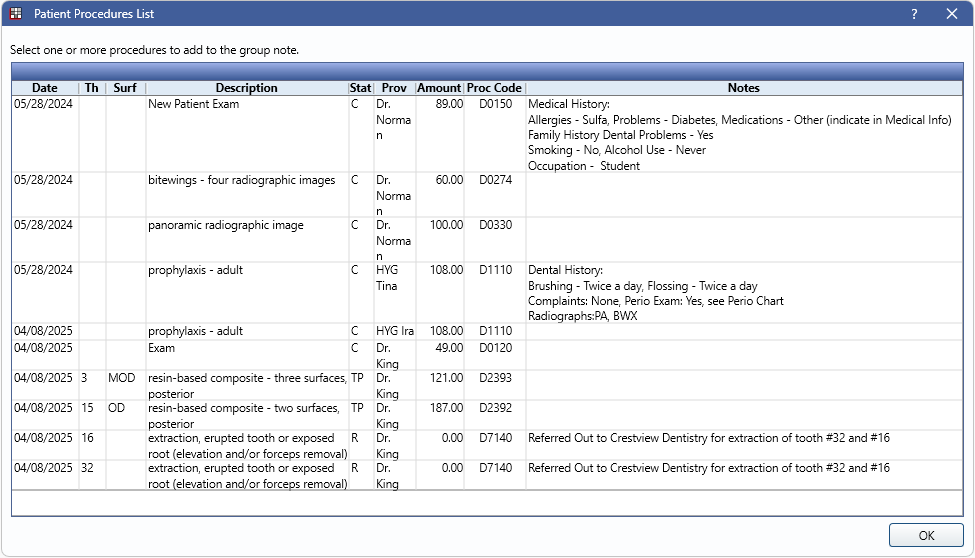
The Patient Procedures List is used to select one or more procedures to be attached to a Group Note for the patient the Group Note was created on.
Multiple procedures with any combination of procedure date, provider, and procedure status, excluding Deleted, can be attached to the same Group Note. Highlight selected procedures and then click OK to attach them to the Group Note.
Date: Displays the Procedure Date.
Th: Procedure tooth number, if applicable.
Surf: Procedure treatment area (e.g., MOD, UL, etc.), if applicable.
Description: Description of the procedure code.
Stat: Procedure status.
Prov: Provider assigned to the procedure.
Amount: Procedure fee (i.e., fee billed to the patient's account).
Proc Code: Procedure Code.
Notes: Shows existing Procedure Notes.