

Search
Appointment Mirroring Overview
See Overviews.
A mirrored appointment allows you to schedule the same appointment in two separate operatories when two providers see a patient during the same appointment. Changes to one appointment are synced to the mirrored appointment.
One Time Setup
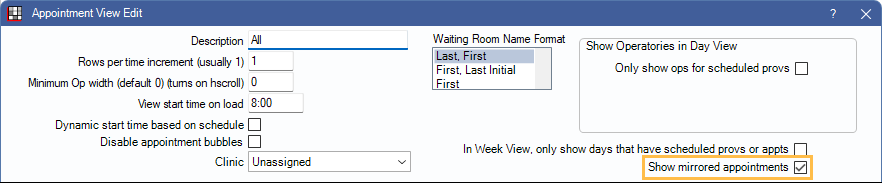
First, ensure the appointment view is marked as Show mirrored appointments.
Additionally, ensure each provider and hygienist is assigned to an operatory.
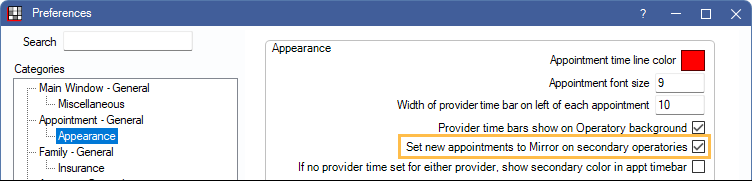
Optionally, to automatically mark newly created mirrored appointments, set the preference, Set new appointments to Mirror on secondary operatories.
Using Mirrored Appointments
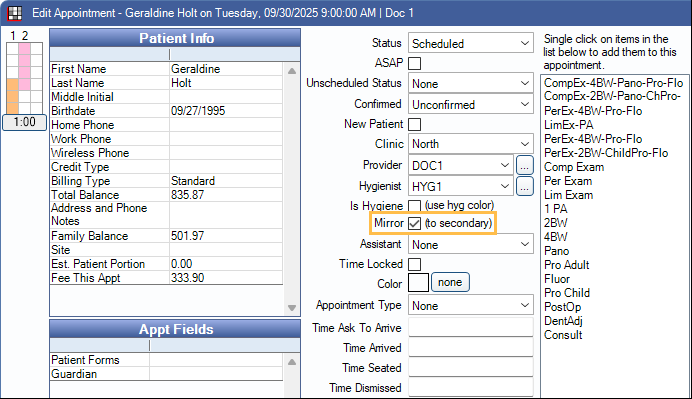
To mirror an appointment, ensure Mirror is checked on the original appointment.
Mirrored appointments display in the secondary provider's operatory for the duration of the provider time selected.

Mirrored appointments can be used when:
- An appointment is in a hygienist's operatory, the Is Hygiene checkbox is checked, and the primary provider is a dentist.
- An appointment is in a dentist's operatory, the Is Hygiene checkbox is not checked, and a hygienist (or other secondary provider) is set as the hygienist.
Mirrored appointments do not consider:
- Blockouts marked as Block appointments scheduling
- Operatories with a closed schedule
- The Appointments allow overlap preference