

Search
Language Translation Overview
See Overviews.
Open Dental can be set up to easily accommodate patients who have a preferred language.
Summary
When set up, language translations allow the office to easily communicate with a patient in their preferred language. For example, a Spanish-speaking patient may prefer a HIPAA form in Spanish. When set up, the patient will automatically be prompted to fill out the Spanish HIPAA form rather than the office default (typically, English). This helps offices be more accommodating to their patient demographic and removes the need for office staff to remember to review the patient's preferred language.
Language Setup
To utilize language translations for patients, start by adding languages in Language Definitions. Add all languages that are commonly used by patients seen by the practice.
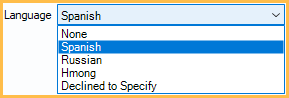
Once added, the added languages list as an option in the Edit Patient Information window. Select the preferred language for a patient.
Translation Setup
When using certain Open Dental features, the preferred language is automatically selected for the patient.
- Language Translations for Sheets
- Setup Recall
- Automated Messaging, Edit Rule window
- eForm Language Translation
In each area, you must manually create the translated message. If no translation exists for a message, the default message is used (usually, English).
For example, if the default language is English, the Default tab shows the text sent to most patients: 
If the patient has Spanish as their preferred language, they are sent the Spanish version instead: 
Limitations
Languages that read right-to-left cannot be rendered to a PDF.
Any non-Latin languages in Sheets cannot be rendered to a PDF.