

Search
eForm Signature Box Edit
eForm Signature Boxes are used for patient signatures.
In eForm Def Edit, click Signature Box.
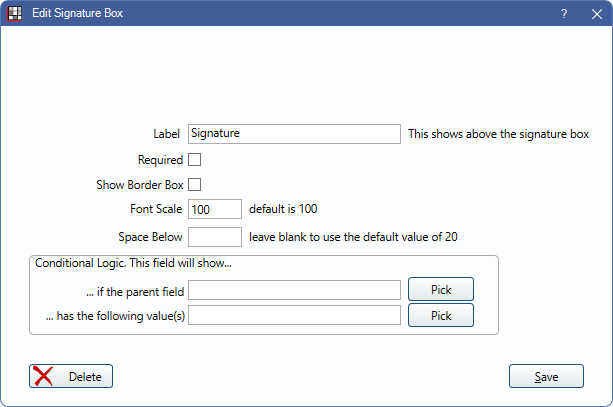
Use Signature Box settings to determine how a field behaves and interacts with other fields. When a Signature Box field is in use on an eForm for a patient, and the box is signed, making any changes to the eForm clears out the signature.
Label: Add a label to describe the signature box (e.g., Signature). Labels are bold when Labels Bold is checked in eForm Def Properties.
Required: Check to require this field be entered by the patient.
Show Border Box: Check to include a light gray border around the field.
Font Scale: Font is scaled to the device the eForm is viewed on.
Space Below: The amount of space below each field on a form. Overrides the amount set in eForm Setup and eForm Def Properties.
Conditional Logic: This field will show...
- ... if the parent field: Click Pick to open the eForm Field Picker window.
- ... has the following value(s): Click Pick to select a value from the parent field (e.g., checked, unchecked).
Language Translation
When editing a translated eForm, the language translation fields display. For more information on editing translations, see eForm Language Translation.