

Search
eForms
eForms are patient forms used with eClipboard 25 or eClipboard Web.
In the Main Menu, click Setup, eForms.
Alternatively, in Patient Forms, click Setup, eForms.
 Watch our webinar: eForms Basics
eForms are an alternative to Sheets, designed exclusively for use with eClipboard 25 and eClipboard Web. They are mobile-optimized for tablet and mobile devices. eForms allow for dynamic fields, so patients only see the fields they need to fill, allowing for a more intuitive patient experience.
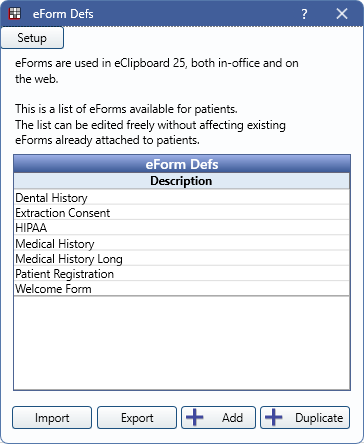
Double-click an eForm from the eForm Defs list to edit. See eForm Def Edit.
- eForms can be used with eClipboard 25 and eClipboard Web.
- Also see eForms: What Patient Sees.
Setup: Click to open eForm Setup.
eForm Defs: This grid displays a list of available eForms. Open Dental preloads various default forms that can be edited as needed. Double-click a form to edit. Default forms in this list are a copy of the internal template. Editing a default form does not alter the internal template.
Import: Click to open the File Explorer to import an eForm. Useful to share forms between locations.
Export: Highlight a form from the eForms Def list, then click to export the file. Useful to share forms between locations.
Add: Click to add a new eForm. Opens the Pick eForm window.
Duplicate: Highlight a form from the eForms Def list, then click to duplicate it.