
Help

Search
eForm Def Properties
eForm properties include the name, eForm type, and other general eForm settings.
In eForm Def Edit, click Edit Properties.
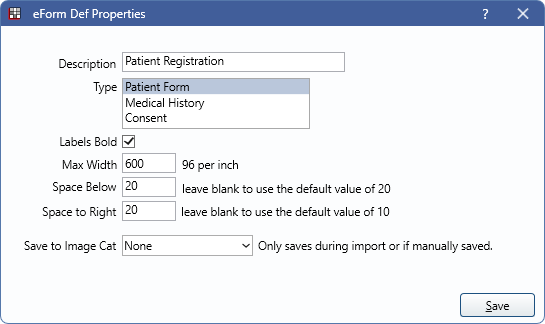
- Description: Name of the eForm.
- Type: Select the type of eForm. Can be changed. Informational only.
- Labels Bold: Make all labels on fields bold. This does not affect the Medications field or the Labels field (different than labels on other fields).
- Max Width: Maximum width of the entire eForm. The default is 600. Scales down on smaller devices.
- Space Below: The amount of space below each field on a form. Overrides the amount set in eForm Setup. Can be overridden on individual fields.
- Space to Right: The amount of space to the right of each field. Overrides the amount set in eForm Setup. Can be overridden on some individual fields.
- Save to Image Cat: Select an image category to save this eForm to when filled from the Fill eForm window, eClipboard 25, or eClipboard Web. The recommendation is to leave the category as None and access forms from the Chart Module instead.