

Search
eForm Language Translation
Many eForm fields share a Language Translation section to determine translations for various items.
In an eForm field is the Language Translation section.

The Language Translation section only displays on an eForm field when editing a translated eForm.
- Language: Displays the current language translation.
- Label: Enter the label of the field as it should display on the eForm.
Medication List
The language translation displays additional fields when editing an eForm Medication List.
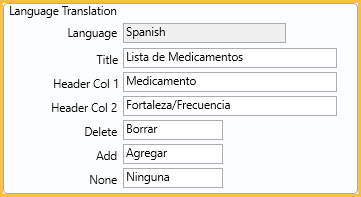
- Language: Displays the current language translation.
- Title: Enter the title of the field as it should display on the eForm.
- Header Col 1: Enter the text to display on the header of the first column.
- Header Col 2: Enter the text to display on the header of the second column.
- Delete: Enter the text to display on the delete button.
- Add: Enter the text to display on the add button.
- None: Enter the text to display on the checkbox for no medications.
Edit Radio Button
In the Edit Radio Button Group window, an additional field is shown in the Pick List grid.
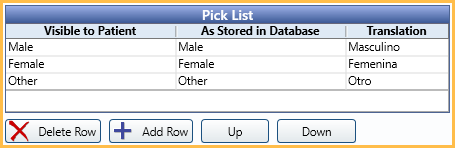
Click a cell in the Translation column to enter the translated text.
Edit Label
The language translation also displays when editing an eForm Label.
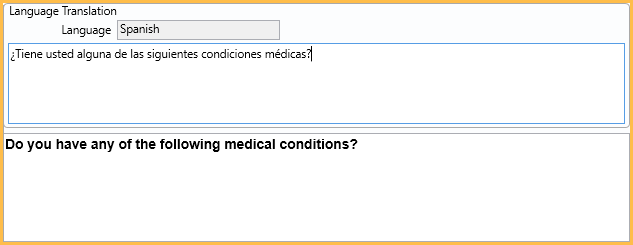
The default text displays at the bottom. Enter the translated text at the top.
Exporting an eForm with a Language
When exporting an eForm, all language translations are included in the export and are imported when shared with another Open Dental database.