

Search
eForm Ins Pick
eForm Ins Pick fields make insurance entry easier for patients and office staff.
In eForm Def Edit, click Ins Pick.
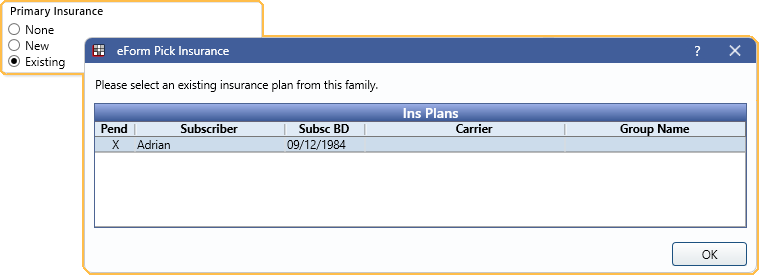
The Ins Pick list allows patients to easily pick an existing insurance plan. When entering new insurance plan details, a Pending Insurance Plan is added to the patient for office staff to finalize.
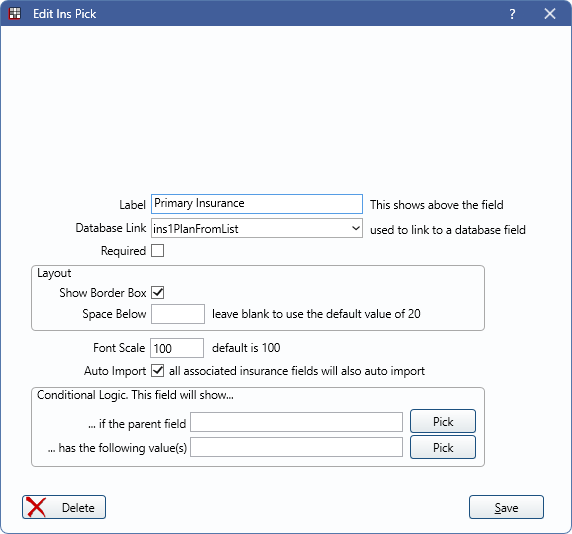
Label: Add a label to describe the Ins Pick box (e.g., Primary Insurance).
Database Link: Where this information imports into the database. Select from ins1PlanFromList or ins2PlanFromList.
Required: Check to require this field be entered by the patient.
Show Border Box: Check to include a light gray border around the field.
Space Below: The amount of space below the field on a form.
Font Scale: Font is scaled to the device the eForm is viewed on.
Auto Import: When checked, these fields are automatically imported to the patient upon submission. All associated insurance fields also import, even if left blank.
Conditional Logic: This field will show...
- ... if the parent field: Click Pick to open the eForm Field Picker window.
- ... has the following value(s): Click Pick to select a value from the parent field (e.g., checked, unchecked).
Language Translation
When editing a translated eForm, the language translation fields display. For more information on editing translations, see eForm Language Translation.
What the Patient Sees
When in use on an eForm, the patient selects from one of three options:
- None: The patient does not have insurance. When selected, corresponding insurance fields do not display on an eForm.
- New: The patient has a new insurance plan. When selected, corresponding insurance fields display and import into the database as a Pending Insurance Plan.
- Existing: The patient is prompted to select from existing insurance plans.
Pending Insurance Plans display in the Family Module. Double-click to open.
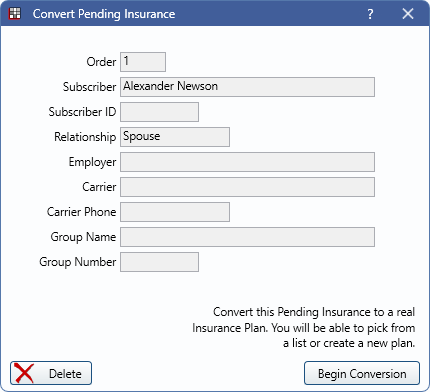
Click Begin Conversion to open the Insurance Plans list. Select an existing plan or create a blank plan.