

Search
eForm Date Field Edit
eForm date fields are used to enter birthdates and other date fields.
In eForm Def Edit, click Date Field.
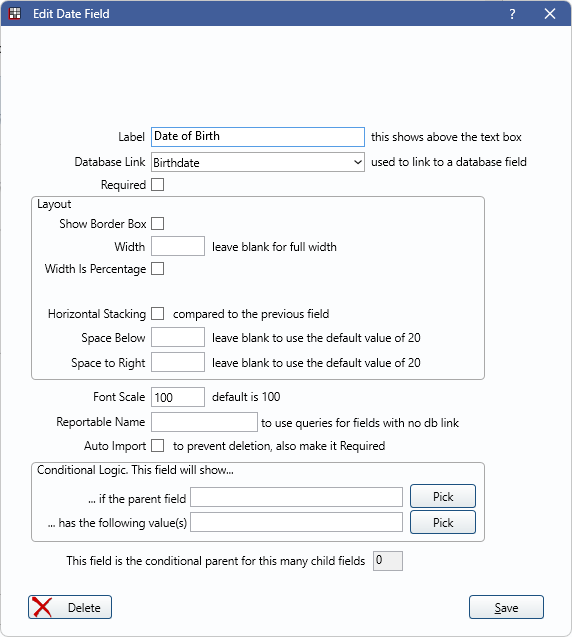
When the Date Field is in use, it displays as a calendar to pick the date from.
Label: Add a label to describe the data to input (e.g., Date of Birth). Labels are bold when Labels Bold is checked in eForm Def Properties.
Database Link: Currently, only links to Birthdate. When None, a date can be entered but is not importable to the database.
Required: Check to require this field to be filled.
Layout: Determine the appearance and behavior of the field. See eForm Field Layout for details.
Font Scale: Font is scaled to the device the eForm is viewed on.
Reportable Name: Give the field a unique name to be reported on in queries. Only used when there is no database link in use.
Auto Import: When checked, these fields are automatically imported to the patient upon submission.
- This option is only available for the Birthdate Database Link.
Conditional Logic: This field will show...
- ... if the parent field: Click Pick to open the eForm Field Picker window.
- ... has the following value(s): Click Pick to select a value from the parent field (e.g., checked, unchecked).
Language Translation
When editing a translated eForm, the language translation fields display. For more information on editing translations, see eForm Language Translation.