

Search
Dental School Evaluation Setup
Set up Evaluations to track student progress.
In Dental School Setup, click Evaluations.
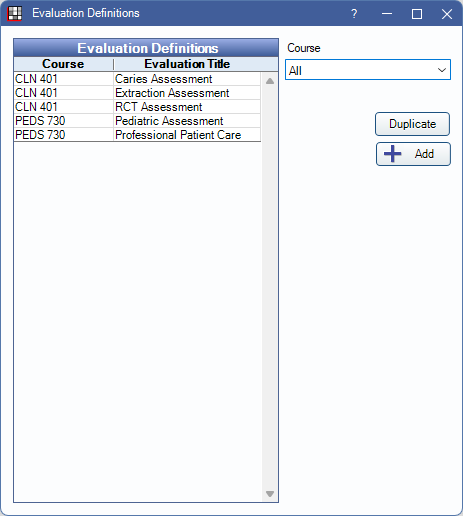
Setting up Dental Student Evaluations includes attaching a grading scale and defining the criteria to be evaluated. To set up evaluations, the logged-on user must have the Setup security permission.
- Evaluation Definitions: Evaluations matching the selected course are listed.
- Course: Select a course from dropdown to filter the Evaluation Definitions list.
- Duplicate: Highlight an evaluation in the grid and click to create a copy. All details are copied, but the Title is appended with -copy.
- Add: Click to create a new evaluation. Opens the Evaluation Definition Edit window (see below).
Evaluation Definition Edit
From Evaluation Definitions, click Add to create a new Evaluation Definition or double-click an existing Evaluation Definition to edit. The Evaluation Definition Edit window opens.
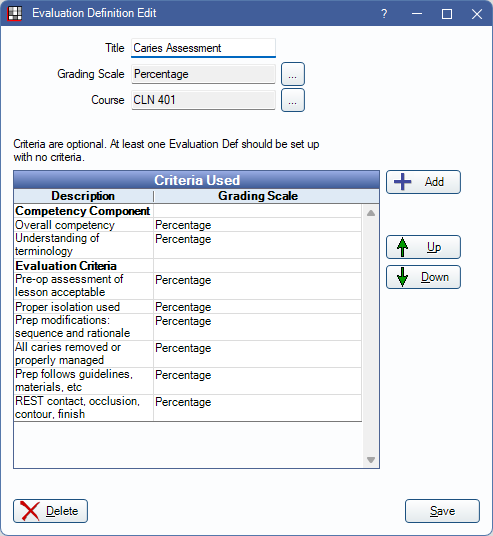
Enter general evaluation information.
- Title: The identifying name of this evaluation.
- Grading Scale: Click [...] to attach a Dental School Grading Scale.
- Course: Click [...] to attach this evaluation to a Dental School Course.
Criteria Used: Lists the any criteria currently added to the Evaluation. If using a weighted grading scale, the total points for all criteria is shown at the bottom
- Up / Down arrows: Select a criterion and click to reorder in the list.
- Add: Click to add Evaluation Criterion. Opens the Evaluation Criterion Def Edit window (see below).
Click Delete to remove this Evaluation Definition. Click Save add a new evaluation or keep changes.
Evaluation Criterion Def Edit
From Evaluation Definition Edit, click Add to create new criterion or double-click an existing criterion from the list to edit.
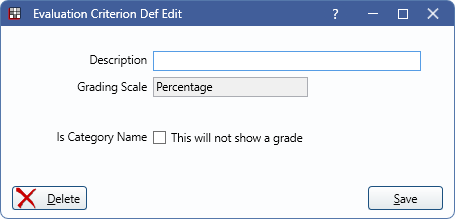
- Description: The identifying name of the criterion.
- Grading Scale: The scale that will be applied to this criterion. By default, the scale of the evaluation is selected. Click [...] to change. The overall grade calculation is always be based on the evaluation's grading scale.
- Points: Only shows if using a weighted grading scale. Enter the maximum number of points possible for this criterion.
- Is Category Name: Check this box to use this criterion as a header in the evaluation. No points or grades are associated with this row; it is for organization purposes only.
Click Delete to remove this criterion from the evaluation. Click Save add new criterion or keep changes.