

Search
Bola AI Bridge
In the Main Menu, click Setup, Program Links. Double-click on Bola AI from https://bola.ai.
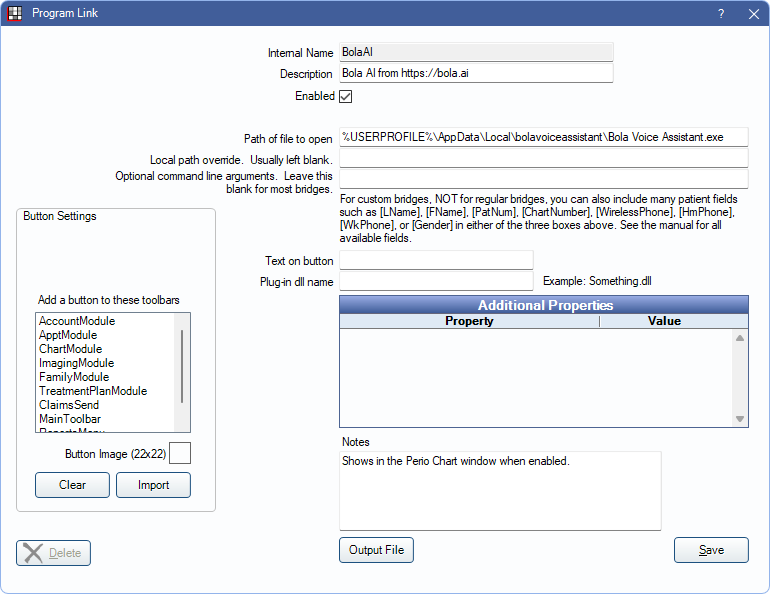
Bola AI is a voice perio charting software. Website: https://bola.ai.
To enable this bridge:
- Check the Enabled box.
- Verify the Path of file to open.
- Click Save.
Once the program link is enabled, a button for Launch Bola Voice is available from the Perio Chart in Open Dental and the Microphone button to use Open Dental's built-in voice perio feature is disabled.
To remove the Bola AI button from the Perio Chart, uncheck Enabled and check Hide Unused Button. For Clinic users, if Bola AI is used by some clinics, but not others, use Hide Button for Clinics and move clinics to the Hidden list instead. When a hidden clinic is selected in the Main Menu, the Bola AI button is hidden and the Microphone button for voice perio is re-enabled.
Additional Details
When the program link is enabled, the title bar of the Perio Chart window displays information about the currently selected data cell, e.g., (6,7,3) (2,g,F,M). This indicates the following:
- Horizontal position of the cell in the grid.
- Vertical position of the selected exam in the grid.
- Position selected in the cell.
- Tooth number.
- Perio sequence type:
- Period (.): Probing
- j: MGJ
- g: Gingival Margin
- f: Furcation
- m: Mobility
- Facial or Lingual coordinate:
- F: Facial
- L: Lingual
- Surface of the tooth:
- M: Mesial
- C: Central
- D: Distal