

Search
Alert Categories
Alerts can be grouped into categories which can then be assigned to users.
In the Main Menu, click Setup, Alert Categories.
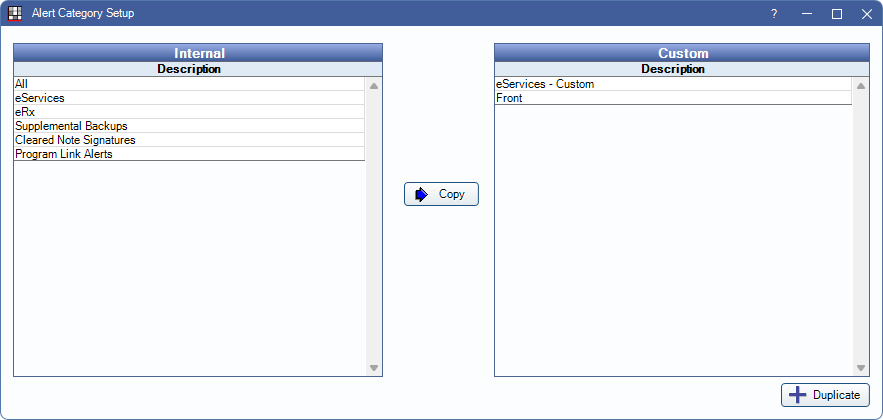
A list of internal groupings displays on the left. Customized Alert Categories show on the right. Only Custom Alert Categories can be edited.
Assign Alert Categories to users in User Edit.
Add a New Category
Select an Internal alert category then click Copy. Or select a Custom alert category and click Duplicate. The new category is added to Custom.
Alert Category Edit
Double-click a custom category to open the Alert Category Edit window.
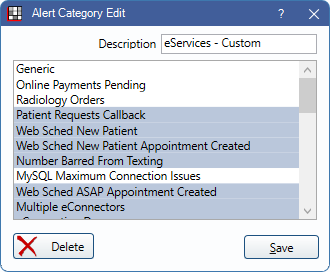
Description: Give the custom category a name.
Select the alerts to attach to the category, then click Save.
Click Delete to delete a custom category.
Internal Categories
By default, there are seven internal Alert Categories:
| Category | Details |
|---|---|
| All | |
| eServices | |
| eRx | |
| Supplemental Backups | |
| Cleared Note Signatures | |
| Program Link Alerts | |
| HQ Notifications | By default, users with the Security Admin permission are subscribed to this category. |
Alert Types
Below is a list of Alert Types. Most types are self-explanatory. Types with additional explanation are noted.
| Type | Details |
|---|---|
| Generic | General Open Dental alerts. |
| Online Payments Pending | |
| Radiology Orders | |
| Patient Requests Callback | |
| Web Sched New Patient | |
| Web Sched New Patient Appointment Created | |
| Number Barred From Texting | |
| MySQL Maximum Connection Issues | |
| Web Sched ASAP Appointment Created | |
| Multiple eConnectors | |
| eConnection Down | |
| eConnection Error | |
| DoseSpot Provider Registered | |
| DoseSpot Clinic Registered | |
| Web Sched Recall Appointment Created | |
| Clinic Feature Changed | |
| Clinic Feature Changed (internal) | |
| Multiple OpenDentalServices | |
| OpenDentalService Down | |
| New WebMail | |
| eConnector Email Send Failures | |
| Supplemental Backups | |
| eConnector Time | |
| CareCredit Batch Errors | |
| Patient Arrival | |
| New Secure Email | |
| Web Sched Existing Pat Appointment Created | |
| Cloud Sessions Limit | |
| Web Forms Ready to Retrieve | |
| Update Completed - Action Required | |
| Replication Monitor Warning | |
| Web Sched Recalls Not Sending | |
| Clinic Has Gone Over Daily Max Message Limit for TenDlc | |
| Invalid Automated Messaging Tags Detected - AddToCalendar Not Allowed When Not Signed Up for eConfirmations | |
| Couldn't generate a tooth chart or perio chart image in the mobile app | |
| The SMS thread is not configured to run and we have queued messages | |
| Procedure or Group Note's Signature Cleared | |
| Pearl AI Imaging Error | Image error regarding items sent to Pearl AI for imaging analysis. |
| Better Diagnostics AI Imaging Error | Image error regarding items sent to BetterDiagnostics for imaging analysis. |
| Message-to-Pay Tag Available for Billing | Specific alert when a Billing Default message template is missing the Message-to-Pay tag. |
| Mass Email audience upload progress | |
| Mass Email commlogs generated | |
| HQ Notifications | Notifications sent to the office from Open Dental Headquarters. |